Spark Processing
Apache Spark 4.0.2 transforms raw VQE simulation results into structured ML feature tables. Processing is batch-oriented and append-only. Every run re-reads all raw files, but only rows that are not yet in the tables are written.
For how Spark fits into the overall architecture, see System Design.
Cluster Architecture
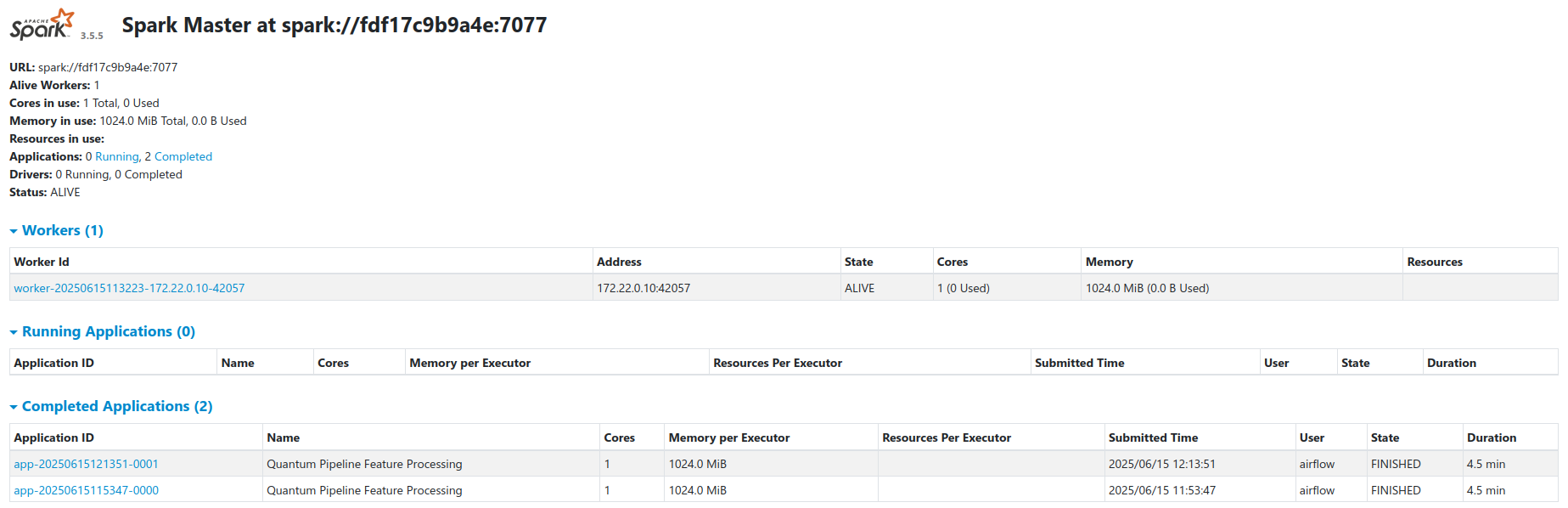
The cluster runs in standalone master-worker mode via a custom Docker image
built from
docker/Dockerfile.spark
(based on apache/spark:4.0.2-python3 with Python upgraded to 3.12 to match
the Airflow driver).
| Node | Role | Resources |
|---|---|---|
spark-master |
Coordinator | 1 GB RAM limit |
spark-worker |
Executor | 3 GB container limit, 2 GB Spark worker memory, 2 cores |
Worker memory and cores are configurable via SPARK_WORKER_MEMORY and
SPARK_WORKER_CORES in
compose/docker-compose.ml.yaml.
Key details:
- Workers register with the master at
spark://spark-master:7077 - Airflow submits jobs via
SparkSubmitOperator - Workers access Garage through the S3A filesystem connector
- Configuration is loaded from
compose/spark-defaults.confmounted into containers - S3 credentials are passed via
AWS_ACCESS_KEY_IDandAWS_SECRET_ACCESS_KEYenvironment variables - JAR dependencies (Iceberg runtime, Hadoop AWS, Spark Avro) are resolved via
Maven/Ivy at startup and cached in the
spark-ivy-cachevolume - Spark Web UI is available at port
8080on the master node (published to host port8080)
Spark Configuration
All Spark scripts use a shared session factory
(docker/airflow/common/spark_factory.py)
that creates a SparkSession with only the app name. All other settings come
from spark-defaults.conf:
| Setting | Value |
|---|---|
| S3A endpoint | http://garage:3901, path-style access, fast upload |
| Iceberg catalog | quantum_catalog, Hadoop type, warehouse at s3a://features/warehouse/ |
| Serialization | KryoSerializer |
| Memory | 1 GB driver, 1536 MB executor, 8 shuffle partitions |
| JARs | iceberg-spark-runtime-4.0_2.13:1.10.1, hadoop-aws:3.4.1, spark-avro_2.13:4.0.2 |
Default S3 paths from
common/pipeline_config.py:
| Path | Default |
|---|---|
| Experiment bucket | s3a://raw-results/experiments/ |
| Feature warehouse | s3a://features/warehouse/ |
Feature Engineering Pipeline
The processing script
quantum_incremental_processing.py
runs these steps for every topic directory under the experiment bucket:
- Read - all raw Avro files of the topic, or all JSON files if the Avro read fails. A topic with no records is skipped.
- Transform - derive
experiment_id, drop redelivered copies and flatten the nested VQE fields into 9 tables. Each table gets four processing metadata columns. - Append absent rows - per table, only rows whose key is not in the table yet are written. See Incremental Processing.
- Tag and record - each written snapshot gets a version tag for
time-travel queries, and one row per run and topic goes into
processing_metadata.
Feature Tables
Base Feature Tables (9 tables)
Produced by the quantum_feature_processing DAG and stored under
quantum_catalog.quantum_features.
| Table | Key Columns | Partition Columns | Purpose |
|---|---|---|---|
molecules |
experiment_id, molecule_id | processing_date | Geometry, symbols, masses, charge |
ansatz_info |
experiment_id, molecule_id | processing_date, basis_set | QASM circuit, repetitions, ansatz name, initialization strategy |
performance_metrics |
experiment_id, molecule_id, basis_set | processing_date, basis_set | Timing breakdown, performance_start / performance_end |
vqe_results |
experiment_id, molecule_id, basis_set | processing_date, basis_set, backend | Energy, iterations, optimizer, exact_estimator flag |
initial_parameters |
parameter_id | processing_date, basis_set | Starting parameter values, one row per parameter |
optimal_parameters |
parameter_id | processing_date, basis_set | Best parameter values, one row per parameter |
vqe_iterations |
iteration_id | processing_date, basis_set, backend | Per-step energy, std, energy and parameter deltas, running minimum |
iteration_parameters |
parameter_id | processing_date, basis_set | Per-step parameter values, one row per parameter |
hamiltonian_terms |
term_id | processing_date, basis_set, backend | Pauli terms with coefficients |
Identifiers
Every run gets an experiment_id, a hash of its inputs (molecule, basis set,
setup, seed) and never of its results. Rerunning the same setup gives the same
id, so the rerun is skipped and the first run wins. A new seed, basis set or
setup gives a new id. The exception is a run with performance monitoring on:
its start time is one of the inputs, so a rerun gets a new id. The ids of the
child tables are built from the experiment_id and a position or step number;
the exact formats are in
the processing script.
Columns added to the base tables: exact_estimator in vqe_results,
performance_start and performance_end in performance_metrics, and the
positional parameter_index and term_index in the parameter and Hamiltonian
tables.
ML Feature Tables (2 tables)
Produced by the quantum_ml_feature_processing DAG
(quantum_ml_feature_processing.py).
The job reads five of the base tables - vqe_iterations, vqe_results,
molecules, performance_metrics and ansatz_info - and joins them into
ML-ready datasets. The other four base tables are not used.
| Table | Purpose | Partition Columns |
|---|---|---|
ml_iteration_features |
One row per iteration per experiment: energy signals, rolling statistics, parameter movement, and molecule and configuration context | processing_date |
ml_run_summary |
One row per run, aggregated from the iteration rows: energy and parameter statistics, plateaus, first and last steps of the trajectory, timing | processing_date, basis_set |
At step 1 there is no previous point, so its delta columns (such as
energy_delta and mean_param_change) are empty. The rolling and trajectory
window sizes are configurable; see
Airflow Orchestration.
Write semantics
- Append-only. Each of the two tables is gated on its own set of
experiment_idvalues: only experiments that are not yet in that table are processed and written. If a run fails between the two writes, the next run fills the missing table. - No full refresh. Existing rows are never recomputed. After a change to a feature definition, drop both ML tables and run the job again. The same holds for the base tables when the key definition changes: tables created by an older version of the processing script have different key values and must be dropped and rebuilt from the raw files, and the ML tables with them.
- Incomplete runs are retried. An experiment whose context rows are missing or have NULLs in required columns is dropped with a warning. Its id stays absent from the table, so a later run retries it once the data is there.
- Checks. The job fails if the joins add or lose iteration rows, or if an
experiment has two rows for the same
iteration_step.
Run-level columns are labels
These columns hold a property of the whole run and are repeated unchanged on
every row of ml_iteration_features: convergence_iteration,
total_iterations, final_energy, converged, relative_iteration,
vqe_time and total_time. At step k they already contain information from
later steps, so for a model that predicts from the first K steps they are
labels or bookkeeping, not features. Every other column at step k is computed
from steps up to k of the same run.
converged is the optimizer's success flag, not agreement with a reference
energy: a run can converge onto a poor local minimum. See also the
ML input contract.
Incremental Processing
Each run:
- Lists the topic directories under the experiment bucket.
- Re-reads every raw file of each topic. The cost of a run grows with the whole history.
- Derives
experiment_idand drops redelivered copies of the same experiment within the batch. Redpanda Connect delivers at least once, so a raw file can arrive twice. - Appends only absent keys. For each table, a left anti-join against the key columns already in the Iceberg table keeps the rows that are not there yet. Rows already in the table are never updated, so the first copy of a key wins.
- Tags the new snapshot and writes one row to
processing_metadata.
The code is in
quantum_incremental_processing.py.
The ML job uses the same idea at experiment level; see
Write semantics.
Related Documentation
- System Design - Full architecture and feature table schemas
- Airflow Orchestration - Spark job scheduling
- Iceberg Storage - Table format and snapshots
- Kafka Streaming - Raw data ingestion