Configuration Reference
Complete reference for all CLI flags accepted by quantum-pipeline.
Configuration Layers
Highest priority first:
| Layer | Source | Purpose |
|---|---|---|
| Config file | File passed with --load |
Overrides the CLI flags |
| CLI arguments | Flags passed to quantum-pipeline |
Runtime overrides |
| Defaults | defaults.py |
Built-in fallback values |
A config file passed with --load is read and validated, and its values then
override the CLI flags, including --exact (see the --load flag below).
Static settings (supported optimizers, basis sets, simulation methods, output
directories) live in
settings.py
and are not meant to be changed at runtime.
Parsed arguments are assembled into typed dataclasses
(BackendConfig,
ProducerConfig,
SecurityConfig)
by
ConfigurationManager.
Environment Variables
Some environment variables are supported for performance monitoring
(MONITORING_*) and Docker deployments (CONTAINER_TYPE, KAFKA_SERVERS),
but they do not participate in the three-layer hierarchy.
Quick Reference
| Category | Flag | Type | Default | Description |
|---|---|---|---|---|
| Required | --file / -f |
path | - | Molecule data file (JSON) |
| Input | --molecule-index |
int | None |
Process single molecule by 0-based index |
| Simulation | --basis / -b |
choice | sto3g |
Basis set (sto3g, 6-31g, cc-pvdz) |
| Simulation | --ansatz |
choice | EfficientSU2 |
Ansatz type (EfficientSU2, RealAmplitudes, ExcitationPreserving) |
| Simulation | --ansatz-reps / -ar |
int | 2 |
Ansatz circuit repetitions |
| Simulation | --ibm |
flag | false |
Use IBM Quantum backend (disables local Aer) |
| Simulation | --min-qubits |
int | None |
Minimum qubit count (IBM only) |
| VQE | --max-iterations |
int | 100 |
Maximum VQE iterations |
| VQE | --convergence |
flag | false |
Enable convergence-based stopping |
| VQE | --threshold |
float | 1e-6 |
Convergence threshold (Hartree) |
| VQE | --optimizer |
choice | L-BFGS-B |
Optimization algorithm |
| VQE | --init-strategy |
choice | random |
Parameter init (random, hf); hf with EfficientSU2 needs --ansatz-reps 3, see below |
| VQE | --seed |
int | None |
Random seed for reproducibility |
| Output | --output-dir |
path | ./gen |
Output directory; currently has no effect, output goes to gen/ |
| Output | --log-level |
choice | INFO |
Logging level (DEBUG, INFO, WARNING, ERROR) |
| Backend | --shots |
int | none (exact) | Sample with this many shots (must be positive); without it the run is exact |
| Backend | --exact |
flag | false |
Exact expectation values; already the default without --shots, overrides --shots |
| Backend | --optimization-level |
int | 3 |
Circuit optimization level (0-3) |
| Features | --report |
flag | false |
Generate PDF report |
| Features | --dump |
flag | false |
Save config to JSON |
| Features | --load |
path | - | Load config from JSON |
| Features | --gpu |
flag | false |
Enable GPU acceleration |
| Features | --simulation-method |
choice | statevector |
Aer simulation method |
| Features | --noise |
string | None |
Noise model backend name |
| Monitoring | --enable-performance-monitoring |
flag | false |
Enable resource monitoring |
| Monitoring | --performance-interval |
int | 30 |
Metrics collection interval (seconds) |
| Monitoring | --performance-pushgateway |
string | None |
Prometheus PushGateway URL |
| Monitoring | --performance-export-format |
choice | both |
Export format (json, prometheus, both) |
| Kafka | --kafka |
flag | false |
Enable Kafka streaming |
| Kafka | --servers |
string | localhost:9092 |
Bootstrap servers |
| Kafka | --topic |
string | experiment.vqe |
Topic name |
| Kafka | --retries |
string | 3 |
Send retry attempts |
| Kafka | --retry-delay |
string | 2 |
Retry delay (seconds) |
| Kafka | --internal-retries |
int | 0 |
Kafka-internal retries (risk of duplicates) |
| Kafka | --acks |
choice | all |
Ack level (0, 1, all) |
| Kafka | --timeout |
int | 10 |
Request timeout (seconds) |
| Security | --ssl |
flag | false |
Enable SSL/TLS for Kafka |
| Security | --disable-ssl-check-hostname |
flag | false |
Disable hostname verification (testing only) |
| Security | --sasl-ssl |
flag | false |
Enable SASL_SSL |
| Security | --ssl-password |
string | None |
SSL private key password |
| Security | --ssl-dir |
path | ./secrets/ |
SSL certificates directory |
| Security | --ssl-cafile |
path | None |
CA certificate file |
| Security | --ssl-certfile |
path | None |
Client certificate file |
| Security | --ssl-keyfile |
path | None |
Client private key file |
| Security | --ssl-crlfile |
path | None |
Certificate revocation list |
| Security | --ssl-ciphers |
string | None |
SSL cipher suite |
| Security | --sasl-mechanism |
choice | - | SASL method (PLAIN, GSSAPI, SCRAM-SHA-256, SCRAM-SHA-512) |
| Security | --sasl-plain-username |
string | None |
SASL username |
| Security | --sasl-plain-password |
string | None |
SASL password |
| Security | --sasl-kerberos-service-name |
string | kafka |
Kerberos service name |
| Security | --sasl-kerberos-domain-name |
string | None |
Kerberos domain |
Simulation Flags
--file / -f (required)
Path to the molecule data file in JSON format. The file must contain an array
of molecule objects with symbols, coords, multiplicity, charge, units,
and masses fields.
--molecule-index
Process only the molecule at this 0-based index. Without this flag, all molecules in the file are processed sequentially.
--basis / -b
Basis set for quantum chemistry calculations.
| Basis Set | Accuracy | Speed | Qubits (H\(_2\)O) |
|---|---|---|---|
sto3g |
Low | Very fast | 14 |
6-31g |
Medium | Medium | 26 |
cc-pvdz |
High | Slow | 48 |
--ansatz
Ansatz circuit type for the parameterized quantum circuit. The entanglement pattern is fixed per ansatz and is not configurable.
| Ansatz | Rotations | Entangling layer | Notes |
|---|---|---|---|
EfficientSU2 (default) |
RY and RZ | CNOTs, reverse-linear | General-purpose; supports --init-strategy hf; at 2 repetitions hf can stall at the Hartree-Fock energy, see --init-strategy |
RealAmplitudes |
RY only | CNOTs, reverse-linear | Half the parameters of EfficientSU2; reaches only states with real amplitudes; supports --init-strategy hf |
ExcitationPreserving |
RZ | XX+YY rotations, all-to-all | Preserves particle number; starts from the Hartree-Fock determinant plus a parameter jitter (narrow for --init-strategy hf, wide for random) and fails without Hartree-Fock data |
See Ansatz Construction for parameter counts and the reasoning behind each configuration.
--ansatz-reps / -ar
Number of repetitions for the ansatz circuit. More reps means more parameters
and a more expressive circuit, but longer optimization. Default: 2.
--ibm
Switch from local Aer simulator to IBM Quantum backend. Requires
IBM_RUNTIME_TOKEN and IBM_RUNTIME_INSTANCE environment variables.
GPU acceleration applies only to the local Aer backend, so --gpu has no
effect with --ibm.
Hardware cannot be exact, so --ibm without --shots samples 1024 shots. Pair it
with a gradient-free optimizer such as COBYLA, because a gradient optimizer,
including the default L-BFGS-B, refuses sampled shots.
--min-qubits
Minimum qubit count for IBM backend selection. Only valid with --ibm.
VQE Flags
--max-iterations
Maximum number of objective evaluations. Default: 100. On the analytic path
(defined under --exact) one evaluation returns the energy and
gradient. On the Aer path (--gpu, --noise, or more than 16 qubits) a gradient
optimizer spends about one evaluation per parameter on each finite-difference
gradient, so raise the limit or use --convergence.
The limit is enforced at two levels: the optimizer config sets maxiter in
the scipy options dict, and the compute_energy() callback raises
MaxFunctionEvalsReachedError as a hard stop.
--convergence and --threshold
Enable convergence-based stopping. When --convergence is set, the optimizer
runs until the energy change between iterations falls below --threshold
(default 1e-6 Hartree).
| Threshold | Precision | Typical use |
|---|---|---|
1.6e-3 |
Chemical accuracy (~1 kcal/mol) | Quick prototyping |
1e-6 |
1 microHartree | Standard runs |
1e-8 |
10 nanoHartree | High-precision research |
Interaction with --max-iterations
If --convergence is enabled and --max-iterations is left at the default
(100), the entry point sets max_iterations to None and uses the
threshold instead. If you pass a non-default --max-iterations as well, it
is ignored and a warning is logged; the threshold decides when the run stops.
--optimizer
Optimization algorithm. The pipeline has 10 optimizers with dedicated configs
via OptimizerConfigFactory. See Optimizers for the full comparison.
Seven of them use a gradient: L-BFGS-B (the default), SLSQP, BFGS, CG,
TNC, Newton-CG and trust-constr. They need exact expectation values, which
any run without --shots provides. With --shots N they are refused before any
computation starts: the pipeline prints the usage and one error line and exits
with code 2. Newton-CG is stricter: it needs the analytic path of --exact, so it
also needs a local run without --noise or --gpu, with at most 16 qubits.
--init-strategy
| Strategy | Description |
|---|---|
random |
Uniform random in [0, 2pi) (default) |
hf |
Hartree-Fock pre-optimized starting point (EfficientSU2, RealAmplitudes); a narrower jitter for ExcitationPreserving |
The flag applies to EfficientSU2 and RealAmplitudes. Without Hartree-Fock
data both log a warning and fall back to random, and the stored init_strategy
then records random. For ExcitationPreserving, hf means a jitter of 0.01
around the Hartree-Fock point and random a jitter of 0.5 inside the
Hartree-Fock electron-number sector; both are recorded as requested.
Measured on H\(_2\)/sto3g with COBYLA in convergence mode, seeds 1-3: hf ended
0 to 8.5 mHa below Hartree-Fock and stayed on that plateau. random reached the
correlated ground state (27 mHa below Hartree-Fock) in 2 of 3 seeds and a poor
minimum in the third. See
Hartree-Fock Initialization.
With hf at the default 2 repetitions a gradient optimizer can stop at the Hartree-Fock energy; see Hartree-Fock initialization.
--seed
Random seed for reproducible parameter initialization. Default: None (random).
ExcitationPreserving falls back to a fixed seed when this flag is omitted, so
its jitter is reproducible either way.
Backend Flags
--shots
Number of measurement samples per circuit execution. Must be a positive
integer. Default: none, which means the run is exact (see
--exact). Pass --shots N to sample instead. With --ibm the
default is 1024, because hardware cannot be exact.
Sampled shots work only with a gradient-free optimizer such as COBYLA. With a
gradient optimizer, including the default L-BFGS-B, the pipeline prints the
usage and one error line and exits with code 2. Drop --shots to run exact, or
add --exact, which overrides --shots.
--exact
A run without --shots is exact: expectation values are computed from the
statevector, with no sampling and no shot noise, and the same seed gives the same
energies. --exact only matters to override --shots. Finite differences over a
sampled energy only measure noise, so a gradient optimizer needs an exact run, and
the default L-BFGS-B works out of the box. Combining sampled shots with a
gradient optimizer exits with code 2 (usage plus one error line).
An exact run uses the analytic path when it is local, noiseless, without --gpu,
has at most 16 qubits and uses a gradient optimizer. The statevector is simulated
directly and the energy and its exact gradient come out of one pass, which
replaces the many extra evaluations that finite differences need. Energies agree
with the Aer exact path to about 1e-13 Ha; see
Analytic Fast-Path Comparison
for timings. Every other exact run, including any with a gradient-free optimizer,
takes the Aer exact path, which estimates gradients by finite differences. An
exact noisy run (a --noise run without --shots) also needs
--simulation-method density_matrix.
--optimization-level
Qiskit transpilation optimization level. Higher levels produce shorter circuits
at the cost of transpile time. Default: 3.
| Level | Description |
|---|---|
0 |
No optimization |
1 |
Light optimization |
2 |
Medium optimization |
3 |
Heavy optimization (recommended) |
--gpu
Enable GPU acceleration. Works with statevector, density_matrix,
and tensor_network simulation methods. GPU options (device, cuStateVec,
memory limits) are configured in
defaults.py.
--simulation-method
Aer backend simulation method. Default: statevector. See
Simulation Methods for the full comparison.
| Method | GPU | Memory | Accuracy |
|---|---|---|---|
automatic |
Partial | Varies | Varies |
statevector |
Yes | High | Exact |
density_matrix |
Yes | Very high | Exact |
matrix_product_state |
No | Low | Approximate |
tensor_network |
Yes (required; needs a cuQuantum build) | Medium | Exact |
--noise
Name of a noise model backend (e.g., ibmq_manila). A noisy run needs either
--shots N or --simulation-method density_matrix; an exact noisy run (no
--shots) on any other method exits with code 2. Noise also rules out the
analytic path.
Output Flags
--output-dir
Directory for output files, graphs, and reports. Default: ./gen. Accepted but
currently has no effect; output goes to gen/.
--log-level
Logging verbosity. Choices: DEBUG, INFO, WARNING, ERROR. Default: INFO.
--report
Generate a PDF report with molecular structure visualizations, Hamiltonian
coefficients, energy convergence plots, and final results. Output goes to
gen/. See an
example report.
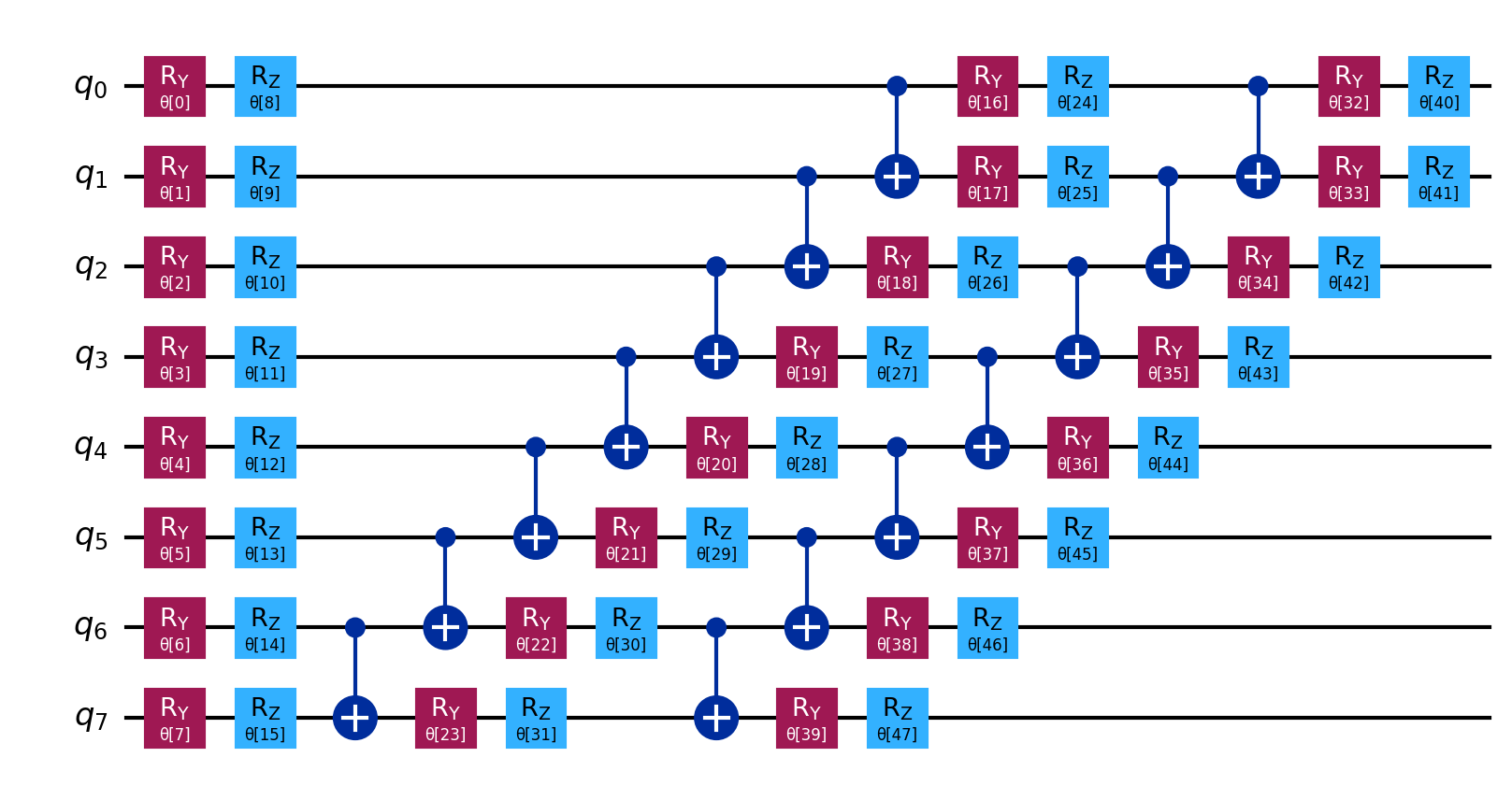
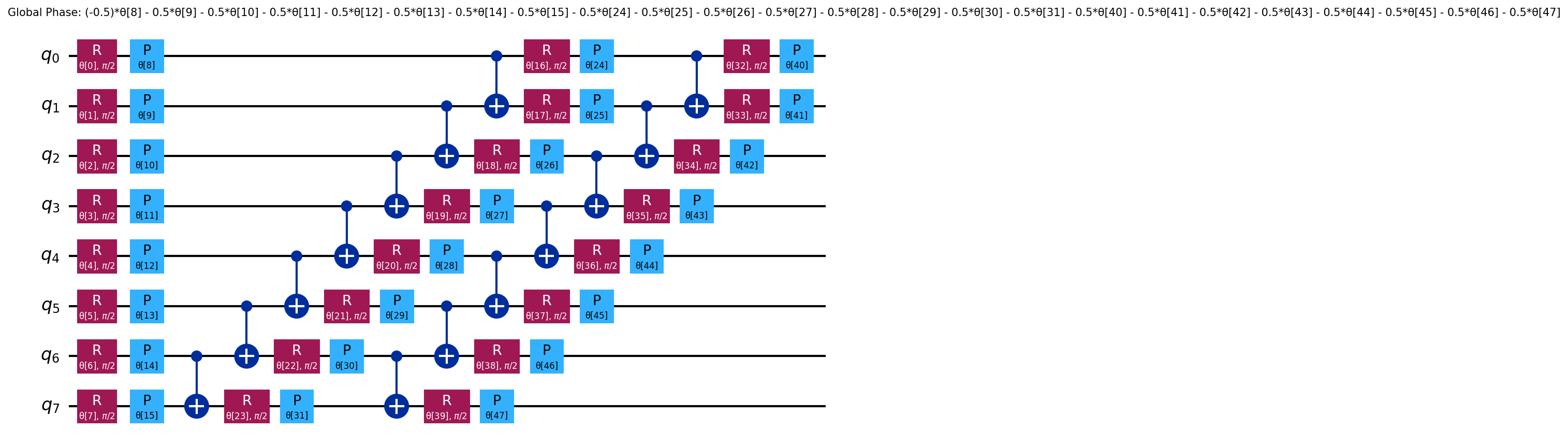
Ansatz circuit diagrams are saved separately in gen/graphs/ because they are
often too large for the PDF
(example,
decomposed).
--dump
Save the current configuration to a JSON file in run_configs/. The filename
follows the pattern {file stem}-{basis}-{optimizer}-{local|api}-{YYYYMMDD}.json
(for example molecules-cc-pvdz-L-BFGS-B-local-20250615.json). Cannot be used
with --load. The run then continues as normal; --dump does not skip the simulation.
--load
Read and validate a previously saved configuration file, then apply it. The
loaded values win over every CLI flag, so a flag such as --exact cannot
override what the file says. A config dumped from a run with sampled shots (for
example an older one, with "shots": 1024) stores them, so loading it with a
gradient optimizer exits with code 2 (usage plus one error line). Dump a config
from a run without --shots, or set "shots": null in the file by hand. --file is still required. Cannot be used with --dump.
quantum-pipeline --file data/molecules.json --exact --load run_configs/molecules-cc-pvdz-L-BFGS-B-local-20250615.json
Monitoring Flags
--enable-performance-monitoring
Enable CPU, GPU, memory, and VQE-specific metrics collection.
--performance-interval
Collection interval in seconds. Default: 30.
--performance-pushgateway
Prometheus PushGateway URL for metrics export.
--performance-export-format
Export format: json, prometheus, or both (default).
Monitoring defaults are also defined in
settings.py:
| Setting | Default |
|---|---|
MONITORING_ENABLED |
False |
PUSHGATEWAY_URL |
http://localhost:9091 |
MONITORING_INTERVAL |
10 seconds |
MONITORING_EXPORT_FORMAT |
['prometheus'] |
Kafka Flags
All Kafka flags require --kafka to be set. Without it, Kafka parameters are
rejected by the argument parser.
--kafka
Enable streaming VQE results to Kafka. Results are serialized in Avro format with automatic Schema Registry integration.
--servers
Bootstrap servers. Default: localhost:9092. Comma-separated for multiple
brokers.
--topic
Topic name. Default: experiment.vqe. Results publish to this literal topic
value. Experiment metadata (molecule, iterations, basis set, backend) travels in
the Avro payload and the producer log lines, not in the topic name.
--acks
Acknowledgment level. Default: all.
| Level | Durability | Speed |
|---|---|---|
0 |
None | Fastest |
1 |
Leader only | Fast |
all |
All replicas | Safest |
--retries, --retry-delay, --internal-retries, --timeout
Retry and timeout settings. --internal-retries controls Kafka's own retry
mechanism, which introduces risk of duplicate messages if set above 0.
Security Flags
Security flags require --kafka to be enabled.
SSL/TLS
Enable with --ssl. Provide certificates in one of two ways:
--ssl-dirpointing to a directory withca.crt,client.crt,client.key- Individual paths via
--ssl-cafile,--ssl-certfile,--ssl-keyfile
These two approaches are mutually exclusive. --ssl-crlfile and
--ssl-ciphers are optional. --ssl-password provides the private key
password if encrypted.
--disable-ssl-check-hostname disables hostname verification. Testing only.
SASL
Enable with --sasl-ssl. Requires --sasl-mechanism.
| Mechanism | Required flags |
|---|---|
PLAIN |
--sasl-plain-username, --sasl-plain-password |
SCRAM-SHA-256 |
--sasl-plain-username, --sasl-plain-password |
SCRAM-SHA-512 |
--sasl-plain-username, --sasl-plain-password |
GSSAPI |
--sasl-kerberos-service-name, optionally --sasl-kerberos-domain-name |
PLAIN/SCRAM credentials cannot be mixed with GSSAPI options.
Validation Rules
The argument parser enforces these rules:
| Rule | Condition |
|---|---|
--dump and --load are mutually exclusive |
Cannot use together |
--min-qubits requires --ibm |
Local simulator ignores it |
--convergence needs a --threshold |
--threshold defaults to 1e-6, so this always holds |
tensor_network requires --gpu |
CPU-only methods: statevector, automatic, etc. |
Kafka params require --kafka |
Changing servers/topic/acks without --kafka is an error |
--ssl requires --kafka |
SSL is for Kafka connections |
--sasl-mechanism requires --kafka |
SASL is for Kafka connections |
--ssl-dir and individual SSL files are mutually exclusive |
Choose one approach |
Gradient optimizer with --shots |
Refused; use a gradient-free optimizer or drop --shots |
Newton-CG |
Needs the analytic path: local, no --noise, no --gpu, at most 16 qubits |
--noise |
Needs --shots N or --simulation-method density_matrix |
--shots |
Must be a positive integer |
A violated rule prints the usage and one error line and exits with code 2.
Environment Variables
# Performance monitoring
export MONITORING_ENABLED=true
export PUSHGATEWAY_URL=http://localhost:9091
export MONITORING_INTERVAL=10
export MONITORING_EXPORT_FORMAT=json,prometheus

# IBM Quantum
export IBM_RUNTIME_TOKEN=your_token_here
export IBM_RUNTIME_INSTANCE=crn:v1:bluemix:public:quantum-computing:...
In Docker deployments, KAFKA_SERVERS, CONTAINER_TYPE, and MAX_ITERATIONS
are set by the container entrypoint. See
Docker Compose.