Basic Usage
CLI syntax
Only --file is required. All other flags have defaults defined in
defaults.py.
Without --shots a run is exact: expectation values come from the statevector, with no
sampling. --exact is therefore optional (see Configuration).
To process a single molecule by its 0-based index:
Common workflows
Configuration files
--dump saves the current CLI configuration. It writes a JSON file to
run_configs/ with a name built from the molecule file, basis set, optimizer,
backend, and date (for example molecules-cc-pvdz-L-BFGS-B-local-20260613.json).
The run then continues as normal; --dump does not skip the simulation:
quantum-pipeline \
    --file data/molecules.json \
    --basis cc-pvdz \
    --max-iterations 200 \
    --optimizer L-BFGS-B \
    --dump
--load points the run at a saved configuration file:
The loaded values are applied and win over every CLI flag, including --exact,
so a flag on the command line cannot override what the file says.
A config dumped from a run with sampled shots stores those shots, so reloading it
with a gradient optimizer exits with code 2 (usage plus one error line).
Dump from a run without --shots, which is exact.
The dumped JSON mirrors the CLI arguments. For the field names, see
defaults.py.
Ansatz and initialization
Three ansatz types are supported: EfficientSU2 (default), RealAmplitudes, and ExcitationPreserving.
The entanglement pattern is fixed per ansatz and is not a command-line option.
Two initialization strategies are available, --init-strategy random (the
default) and --init-strategy hf, but what they do depends on the ansatz:
| Ansatz | Parameters start at | Effect of --init-strategy hf |
|---|---|---|
EfficientSU2 |
Uniform [0, 2pi) | Runs a pre-optimization that finds parameters reproducing the Hartree-Fock state. At 2 repetitions an optimizer can stall there, see below |
RealAmplitudes |
Uniform [0, 2pi) | Runs the same pre-optimization |
ExcitationPreserving |
A small jitter off zero, applied on top of the Hartree-Fock determinant the circuit always starts from | Narrows the jitter (standard deviation 0.01 instead of 0.5); the Hartree-Fock reference is built into the circuit either way |
With hf at the default 2 repetitions, a gradient optimizer can stop at the Hartree-Fock energy; see Hartree-Fock initialization.
For EfficientSU2 and RealAmplitudes, hf falls back to random, with a
warning, only when no Hartree-Fock data is available. What the strategies did in
the runs so far is described under
--init-strategy.
ExcitationPreserving needs Hartree-Fock data to build its initial state; the
CLI always supplies that from the PySCF driver, so only a programmatic run that
omits it can fail. See
Ansatz Construction for
why each ansatz starts where it does.
Simulation methods
The --simulation-method flag selects the Aer simulator backend:
| Method | Description |
|---|---|
statevector |
Dense statevector simulation (default) |
automatic |
Aer selects the best method based on circuit and noise model |
density_matrix |
Dense density matrix, for noisy circuits |
matrix_product_state |
Tensor-network MPS, lower memory for large circuits |
tensor_network |
GPU-only, needs a cuQuantum build of Aer |
tensor_network requires the --gpu flag.
Output structure
Results are saved under the gen/ directory. The --output-dir flag is accepted but currently has no effect; output always goes to gen/.
gen/
  graphs/
    molecule_plots/
    operator_plots/
    complex_operator_plots/
    energy_plots/
    ansatz/
    ansatz_decomposed/
  performance_metrics/
  *.pdf
PDF reports are generated when --report is passed. See an
example report.
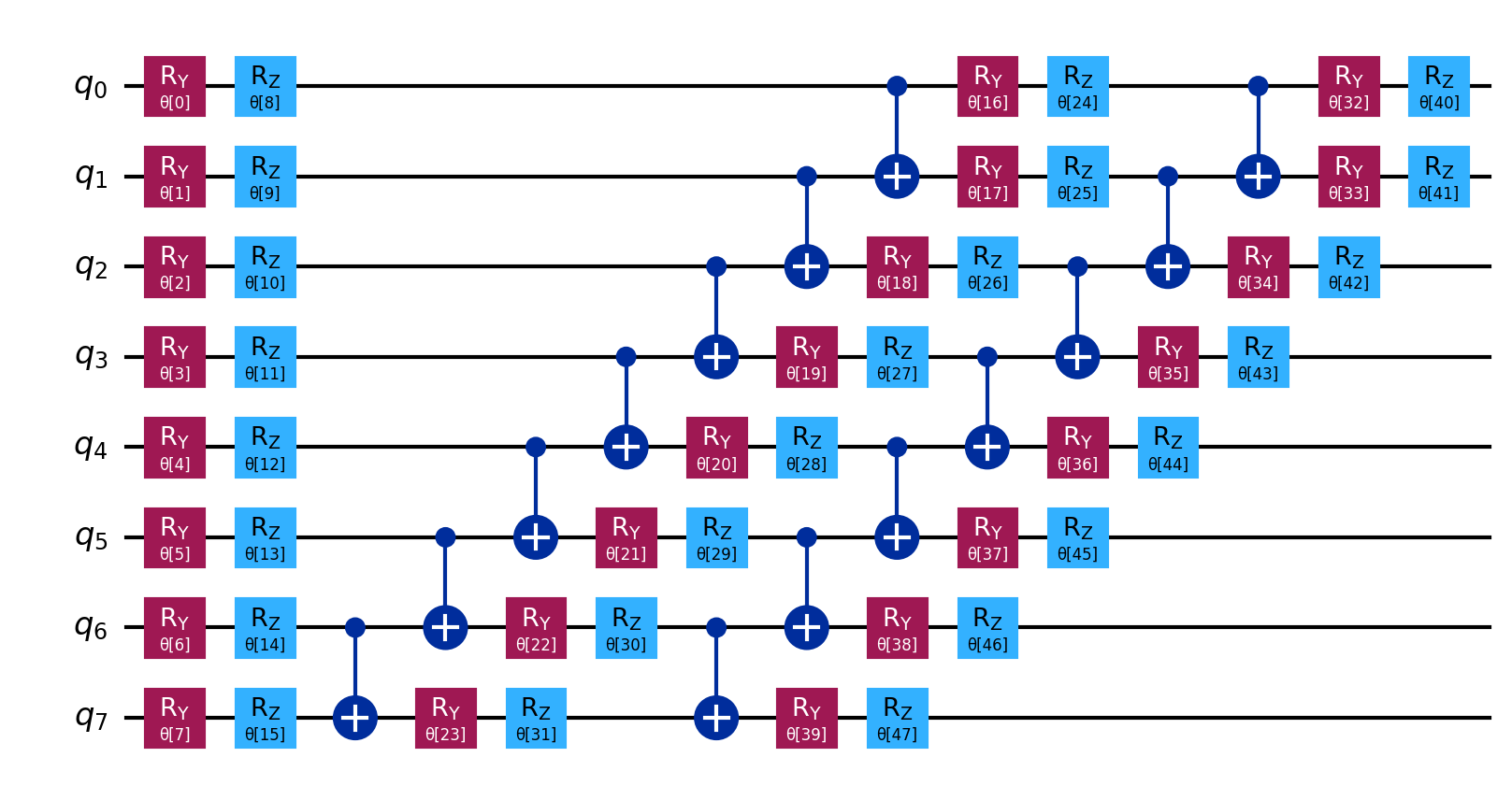
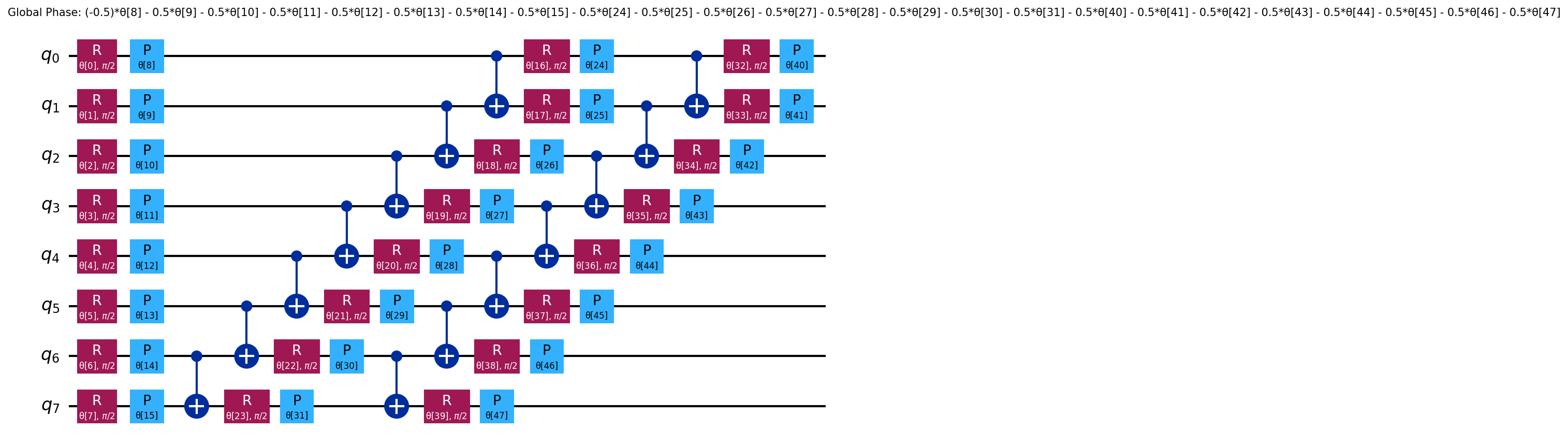
The ansatz/ and ansatz_decomposed/ directories contain circuit diagrams that
often are too large to fit into the PDF, especially for larger molecules.
See ansatz and
decomposed ansatz
for H2.
Log levels
Control verbosity with --log-level:
# Minimal output
quantum-pipeline --file data/molecules.json --log-level ERROR

# Default
quantum-pipeline --file data/molecules.json --log-level INFO

# Verbose
quantum-pipeline --file data/molecules.json --log-level DEBUG
Performance monitoring
Enable system resource tracking during simulation:
quantum-pipeline \
    --file data/molecules.json \
    --enable-performance-monitoring \
    --performance-interval 30 \
    --performance-pushgateway http://localhost:9091 \
    --performance-export-format both
Or via environment variables:
export MONITORING_ENABLED=true
export PUSHGATEWAY_URL=http://localhost:9091
export MONITORING_INTERVAL=10
export MONITORING_EXPORT_FORMAT=both
quantum-pipeline --file data/molecules.json
See Monitoring for more.
Recipes - basic parameter combinations
Fast prototyping
quantum-pipeline \
    --file data/molecules.json \
    --basis sto3g \
    --max-iterations 50 \
    --optimizer COBYLA
Balanced
quantum-pipeline \
    --file data/molecules.json \
    --basis sto3g \
    --max-iterations 150 \
    --optimizer L-BFGS-B \
    --ansatz-reps 2
High accuracy
quantum-pipeline \
    --file data/molecules.json \
    --basis cc-pvdz \
    --convergence \
    --threshold 1e-8 \
    --optimizer L-BFGS-B \
    --init-strategy hf \
    --ansatz-reps 5
Python API
The pipeline can also be used programmatically. The VQERunner
class accepts parameters similar to the CLI:
from quantum_pipeline.runners.vqe_runner import VQERunner

runner = VQERunner(
    filepath='data/molecules.json',
    basis_set='sto3g',
    max_iterations=100,
    optimizer='L-BFGS-B',
    default_shots=None,  # exact expectation values, needed by L-BFGS-B
    init_strategy='hf',
    seed=42,
)
runner.run()

# Results are stored per molecule
for result in runner.run_results:
    print(f'{result.basis_set}: {result.vqe_result.minimum:.6f} Ha')
    print(f'  Iterations: {len(result.vqe_result.iteration_list)}')
    print(f'  Total time: {result.total_time:.2f}s')
The constructor defaults differ from the CLI: when you omit them it uses the
COBYLA optimizer (CLI default is L-BFGS-B) and ansatz_reps=3 (CLI default is
2). The constructor samples 1024 shots by default (default_shots=1024), and a
gradient optimizer such as L-BFGS-B refuses sampled shots. default_shots=None gives
exact expectation values, which is what the CLI does when you leave out --shots. Pass these explicitly to
reproduce a CLI run. For the full constructor
signature, see the source.
Next steps
- Configuration Reference - all available parameters
- Optimizer Guide - choosing the right optimizer
- Simulation Methods - backend details
- Examples - more use cases