Examples
Usage examples for common Quantum Pipeline workflows, from simple simulations to full data pipeline integration.
Simple H\(_2\) Simulation
Run a minimal VQE simulation for a hydrogen molecule to verify the pipeline works.
quantum-pipeline \
    -f data/molecules.json \
    --molecule-index 0 \
    --basis sto3g \
    --max-iterations 50 \
    --optimizer L-BFGS-B
A run without --shots is exact: expectation values are computed from the statevector, with no sampling (see --exact). With a gradient optimizer such as L-BFGS-B, a local run, no noise, no --gpu and at most 16 qubits, this is the analytic path, which computes energies and gradients directly on the statevector.
The sto3g basis set is the smallest and fastest, useful for quick tests. H\(_2\) maps to 4 qubits with sto3g,
making it a simple test case. The expected ground state energy for H\(_2\) at 0.74 Angstrom bond length is
approximately -1.137 Hartree.
With the default random initialisation and 2 ansatz repetitions, a single run can stop at the Hartree-Fock energy and report a higher energy (see Hartree-Fock initialization); to reach it reliably add --init-strategy hf --ansatz-reps 3 --seed 42. This is the total energy, printed on the "Total energy (electronic + nuclear repulsion)" log line; the "Best energy" line is the electronic part only (about -1.852 Ha at the ground state).
Multi-Molecule Batch Processing
Process multiple molecules in a single run using the same simulation configuration. The pipeline processes each molecule sequentially - for each one it generates the Hamiltonian, maps to qubits, and runs VQE.
The molecule data file is a JSON array. See the included data/molecules.json for the format.
| Field | Type | Description |
|---|---|---|
symbols |
string array | Atom symbols (e.g. ["H", "H"]) |
coords |
float array | 3D coordinates per atom |
multiplicity |
int | Spin multiplicity |
charge |
int | Net charge |
units |
string | Distance unit (e.g. "angstrom") |
masses |
float array | Atomic masses |
quantum-pipeline \
    -f data/molecules.json \
    --basis sto3g \
    --max-iterations 100 \
    --optimizer L-BFGS-B \
    --ansatz-reps 2 \
    --report
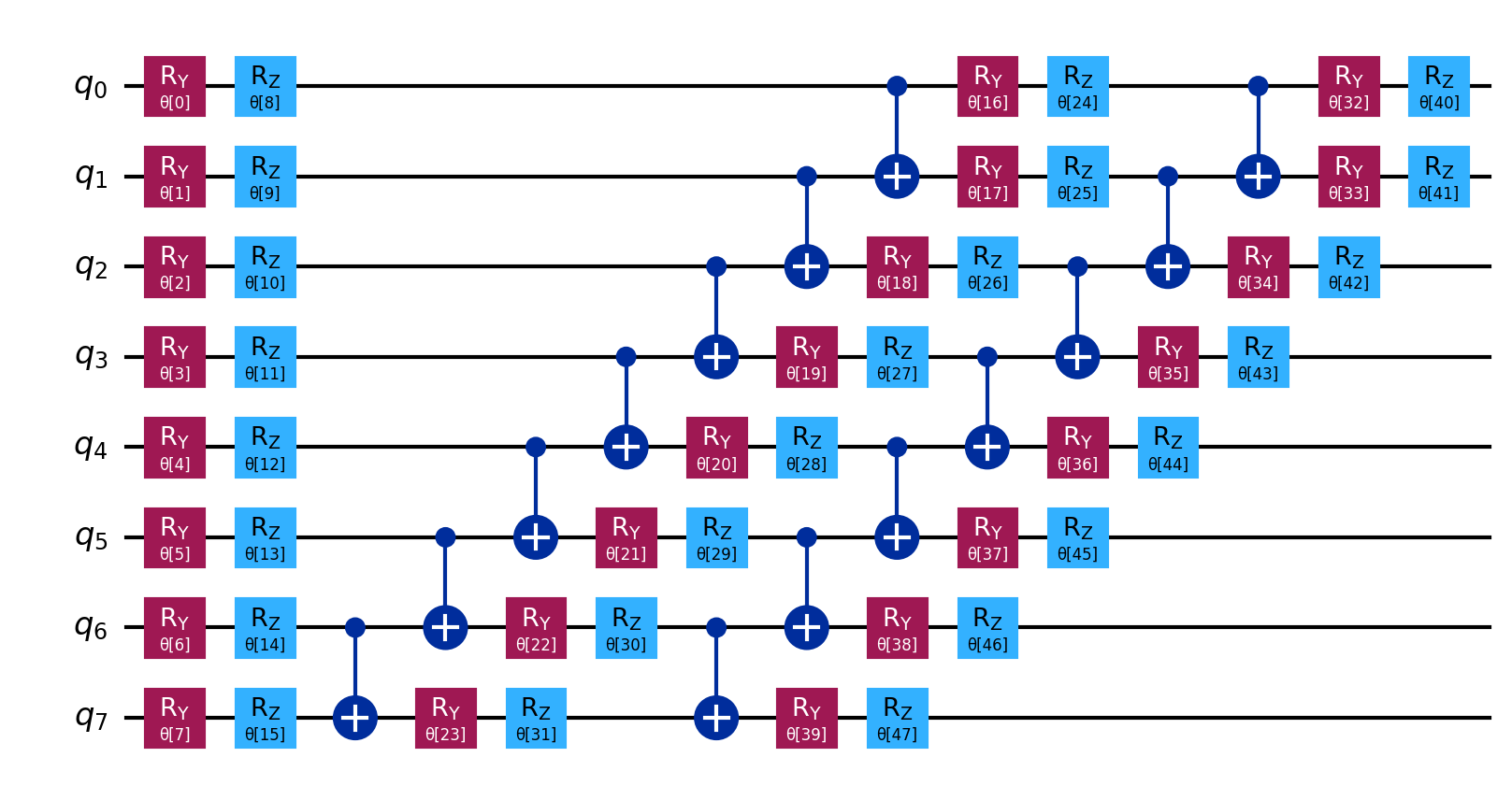
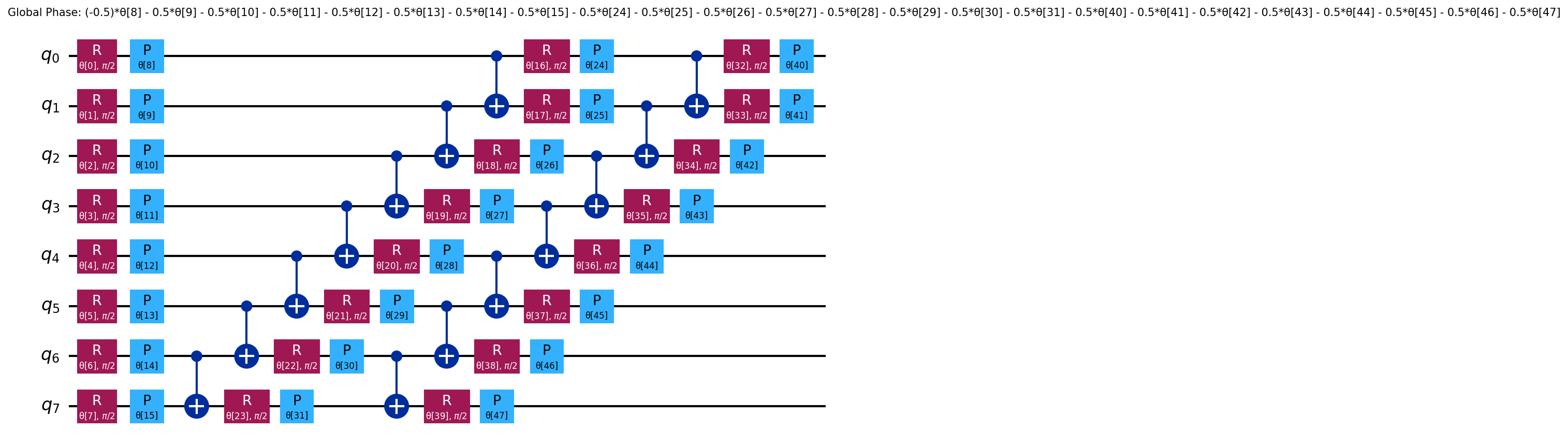
Use --report to generate a PDF report in gen/ with molecular structure, convergence plots, and Hamiltonian coefficients. Ansatz circuit diagrams are saved separately in gen/graphs/ (example, decomposed). Larger molecules need more qubits: H\(_2\) uses 4, LiH uses 12, H\(_2\)O uses 14 (with sto3g). Processing time varies accordingly.
GPU-Accelerated Simulation
Run a higher-accuracy simulation using GPU acceleration with the cc-pvdz basis set.
quantum-pipeline \
    -f data/molecules.json \
    --basis cc-pvdz \
    --convergence \
    --threshold 1e-8 \
    --optimizer L-BFGS-B \
    --init-strategy hf \
    --ansatz-reps 5 \
    --optimization-level 3 \
    --gpu \
    --simulation-method statevector \
    --report
GPU acceleration offloads statevector operations to the NVIDIA GPU. The cc-pvdz basis set provides
higher accuracy but needs significantly more qubits (e.g. 48 for H\(_2\)O).
Convergence mode runs until the energy change falls below the threshold.
With --gpu the run uses the Aer exact path, not the analytic path.
The --init-strategy hf flag pre-optimizes the parameters against Hartree-Fock data, so the optimizer
starts from the Hartree-Fock state instead of a random point. Random starts ended in poor local minima
in the thesis runs; the one measured comparison is under --init-strategy.
This example leaves --ansatz at its default, EfficientSU2, and uses 5 repetitions:
with hf, EfficientSU2 is more reliable at 3 repetitions, because at 2 a gradient
optimizer can stop at the Hartree-Fock energy;
see Hartree-Fock initialization. See Ansatz and Init Strategy Comparison
for what the flag does with the other two.
GPU performance
In thesis benchmarks (GTX 1060/1050 Ti, H\(_2\) molecule), GPU acceleration provided 1.7-4x speedup depending on basis set and circuit size. The cc-pvdz basis set generates many more qubits than sto3g, so ensure you have enough GPU memory (6+ GB recommended). For circuits exceeding GPU memory, consider --simulation-method tensor_network.
Full Data Pipeline with Kafka
Run a VQE simulation with Kafka streaming enabled, demonstrating the complete data pipeline from simulation to storage.
Start the infrastructure stack first using Docker Compose. See the compose/ directory and the Docker Compose deployment guide for available configurations.
quantum-pipeline \
    -f data/molecules.json \
    --basis sto3g \
    --max-iterations 150 \
    --optimizer L-BFGS-B \
    --gpu \
    --simulation-method statevector \
    --kafka \
    --servers kafka:9092 \
    --topic experiment.vqe \
    --acks all \
    --retries 3
What happens:
- The VQE simulation runs with GPU acceleration.
- Results are serialized using Avro format and the schema is registered with the Schema Registry.
- The serialized result is published to the Kafka topic.
- Redpanda Connect picks up the message and decodes it and writes it to Garage (S3-compatible storage) as a JSON file.
The --kafka flag is required to enable streaming. Without it, other Kafka parameters are ignored.
If the broker is unreachable, the run exits with code 1 after spooling the results to gen/undelivered/.
After Redpanda Connect transfers data to Garage, Apache Airflow can trigger Spark processing for feature engineering.
Convergence-Based Optimization
Use convergence-based stopping instead of a fixed iteration count, allowing the optimizer to run until the energy stabilizes.
quantum-pipeline \
    -f data/molecules.json \
    --basis sto3g \
    --convergence \
    --threshold 1e-6 \
    --optimizer L-BFGS-B
The optimizer runs until the energy change between consecutive iterations falls below the threshold. The number of iterations depends on the molecule, basis set and optimizer; thesis H\(_2\) runs with L-BFGS-B took about 650 iterations.
Threshold guidelines
| Threshold | Precision level | Typical use case |
|---|---|---|
1.6e-3 |
Chemical accuracy (~1 kcal/mol) | Fast prototyping |
1e-6 |
Standard (1 microHartree) | General runs |
1e-8 |
High precision (10 nanoHartree) | Publication-quality research |
If --convergence is set, --max-iterations is ignored (with a warning if it was set to a non-default value); the threshold decides when the run stops.
For L-BFGS-B, the convergence threshold is passed as ftol and gtol in the options dict. For COBYLA and other optimizers, it is passed as the global tol parameter to scipy.optimize.minimize.
Configuration Save and Load
Save a simulation configuration for reproducibility and reload it later.
Save configuration
Adding --dump saves the run configuration as a JSON file in run_configs/.
The filename encodes the molecule file, basis, optimizer, backend, and date
(for example molecules-cc-pvdz-L-BFGS-B-local-20250615.json).
The run then continues as normal; --dump does not skip the simulation.
quantum-pipeline \
    -f data/molecules.json \
    --basis cc-pvdz \
    --convergence \
    --threshold 1e-6 \
    --optimizer L-BFGS-B \
    --ansatz RealAmplitudes \
    --init-strategy hf \
    --ansatz-reps 3 \
    --gpu \
    --simulation-method statevector \
    --dump
Load a saved configuration
quantum-pipeline --file data/molecules.json --load run_configs/molecules-cc-pvdz-L-BFGS-B-local-20250615.json
--dump and --load are mutually exclusive.
The loaded values win over every CLI flag, including --exact. A config dumped from a run with
sampled shots (for example an older one with "shots": 1024) stores them, so a gradient optimizer
such as L-BFGS-B is rejected on reload.
Dump a config from an exact run (no --shots), or set "shots": null in the file by hand.
Programmatic Usage
The pipeline can also be used as a Python library through the VQERunner class. It accepts the same parameters as the CLI but as constructor arguments, and returns VQEDecoratedResult objects containing the full simulation data, including per-iteration energy values.
Backend, Kafka producer, and security settings can be passed as BackendConfig, ProducerConfig, and SecurityConfig objects respectively.
Note that a few VQERunner constructor defaults differ from the CLI defaults:
the optimizer defaults to COBYLA (CLI: L-BFGS-B) and ansatz_reps defaults to 3 (CLI: 2)
The constructor samples 1024 shots by default (default_shots=1024), and a gradient optimizer such
as L-BFGS-B refuses sampled shots.
Pass default_shots=None for exact expectation values, which is what the CLI does when you leave
out --shots. Pass all of these explicitly when you want a run to match its CLI equivalent.
This is useful for parameter sweeps, automated benchmarks, and integration with analysis notebooks.
Full Stack Experiment
Run experiments with the full ML data pipeline. Copy the .env.ml.example file and customize it for your system:
Start the full stack using Docker Compose (see the Docker Compose deployment guide), then monitor progress through container logs and nvidia-smi.
Ansatz and Init Strategy Comparison
Compare different ansatz types and initialization strategies to find the best combination for a given molecule.
# RealAmplitudes with random init
quantum-pipeline \
    -f data/molecules.json \
    --basis sto3g \
    --max-iterations 100 \
    --optimizer L-BFGS-B \
    --ansatz RealAmplitudes \
    --init-strategy random \
    --seed 42 \
    --report

# EfficientSU2 with Hartree-Fock init (3 repetitions; see [Hartree-Fock initialization](../scientific/vqe-algorithm.md#hartree-fock-initialization))
quantum-pipeline \
    -f data/molecules.json \
    --basis cc-pvdz \
    --max-iterations 200 \
    --optimizer L-BFGS-B \
    --ansatz EfficientSU2 \
    --ansatz-reps 3 \
    --init-strategy hf \
    --seed 42 \
    --report

# ExcitationPreserving ansatz
quantum-pipeline \
    -f data/molecules.json \
    --basis sto3g \
    --max-iterations 100 \
    --optimizer L-BFGS-B \
    --ansatz ExcitationPreserving \
    --ansatz-reps 3 \
    --report
With the same --seed and configuration, runs give the same results. Use --report to generate convergence plots for visual
comparison.
The commands above vary the ansatz and the strategy together rather than
crossing them, because --init-strategy hf does something different for each
ansatz:
| Ansatz | Entangling layer | Circuit starts from | Effect of --init-strategy hf |
|---|---|---|---|
EfficientSU2 (default) |
CNOTs, reverse-linear | All-zero state, parameters uniform [0, 2pi) | Pre-optimizes the parameters to reproduce the Hartree-Fock state. At 2 repetitions a gradient optimizer can stop at the Hartree-Fock energy, so prefer --ansatz-reps 3 (see Hartree-Fock initialization) |
RealAmplitudes |
CNOTs, reverse-linear | All-zero state, parameters uniform [0, 2pi) | Runs the same pre-optimization |
ExcitationPreserving |
XX+YY rotations, all-to-all | The Hartree-Fock determinant, prepended as a fixed initial state, with parameters jittered off zero | Narrows the jitter (0.01 instead of 0.5); the Hartree-Fock reference is in the circuit either way |
RealAmplitudes keeps only the real-valued RY rotations, which halves the
parameter count and suits Hamiltonians whose ground state has predominantly
real coefficients. ExcitationPreserving conserves particle number, so the
optimizer cannot wander into states with the wrong electron count, at the cost
of a parameter count that grows quadratically in qubits. The entanglement
pattern is fixed per ansatz and is not a command-line option. See
Ansatz Construction for
the full comparison and the reasoning behind each choice.
Quick reference
| Example | Use case | Key flags |
|---|---|---|
| Simple H\(_2\) | Installation test | --basis sto3g --max-iterations 50 |
| Batch Processing | Multi-molecule runs | --report |
| GPU Research | High-accuracy GPU | --gpu --basis cc-pvdz --init-strategy hf |
| Data Pipeline | Kafka streaming | --kafka --servers kafka:9092 |
| Convergence | Adaptive stopping | --convergence --threshold 1e-6 |
| Save/Load | Record run settings | --dump / --load |
| Python API | Programmatic usage | VQERunner class |
| Full Stack | Full ML pipeline | .env.ml.example |
| Ansatz/Init | Ansatz comparison | --ansatz --init-strategy |
Next steps
- Configuration Reference for detailed parameter documentation
- Optimizers for optimizer choices
- Simulation Methods for backend selection
- Docker Compose for deployment